Jun
17
2013
We will show in this post how you can gather evidence of a potential remote attack on your Windows computer with some Powershell one-liners. This is done by analyzing the security log with the Get-EventLog cmdlet and by displaying active remote connections with the Netstat command.
Read more »
Apr
23
2013
We will describe in this post how to connect to an Oracle database using Powershell cmdlets, this database hosts HR data. We will check if every employee has an Exchange 2010 mailbox. The common key between both systems (Oracle and Exchange) has to be a filterable attribute for performance issues when querying the Exchange mailboxes. Exchange’s attribute is CustomAttribute13 in our example and the corresponding Oracle value is HRCODE.
Read more »
Mar
15
2013
In order to control what processes are running on your clients you can use the Software Restriction Policies or tools like Applocker or Bit9. You can also increase the security of you system on the allowed processes by enabling some mitigations like DEP, ASLR, SEHOP… We will describe in this post how to use EMET: A tool provided by Microsoft which allows you to configure these features. By protecting the processes running on your computer with these features you can even be protected against some 0-day exploits.
Read more »
Feb
12
2013
Once hackers gain domain administrator privileges and are able to logon to domain controllers they usually try to dump the NTDS database (see chapter Dumping All The Hashes–ntdsgrab.rb). This way they will try to crack every single domain user’s password, this happened recently when the New York Times was targeted by a cyber-attack. We will see in this post how to make this task more difficult to a hacker who has gained domain admin privileges by modifying some security settings on the Domain controllers.
Read more »
Jan
06
2013
The root update package KB931125, when applied might break the authentication process on servers using certificate based authentication: This problem was reported for LDAP over SSL authentication on a Domain Controller, IIS authentication on a webserver and IAS authentication on a Radius server (called Network Policy Server under Windows 2008). The symptoms, patch and workarounds of this issue are explained in this KB. The patch is only available under Windows 2003 and the root update package (KB931125) cannot be uninstalled via WSUS once applied.
Read more »
Dec
10
2012
We will see in this post some steps of a pentest against an ADDS domain. This pentest focuses only on the Microsoft System and does not take into account Antivirus, Firewall, IDS and IPS protections. The parts we describe in detail are scanning, exploitation and maintaining access. The pentest is performed with BackTrack 5 R3, you can download it here. The tools we use are Nmap, Nessus, Metasploit (the hacker’s framework, exploits are written in ruby), John the Ripper and Powershell. The pentest’s goal is to retrieve domain administrator credentials and maintain the access on the ADDS domain discretly.
Read more »
Oct
07
2012
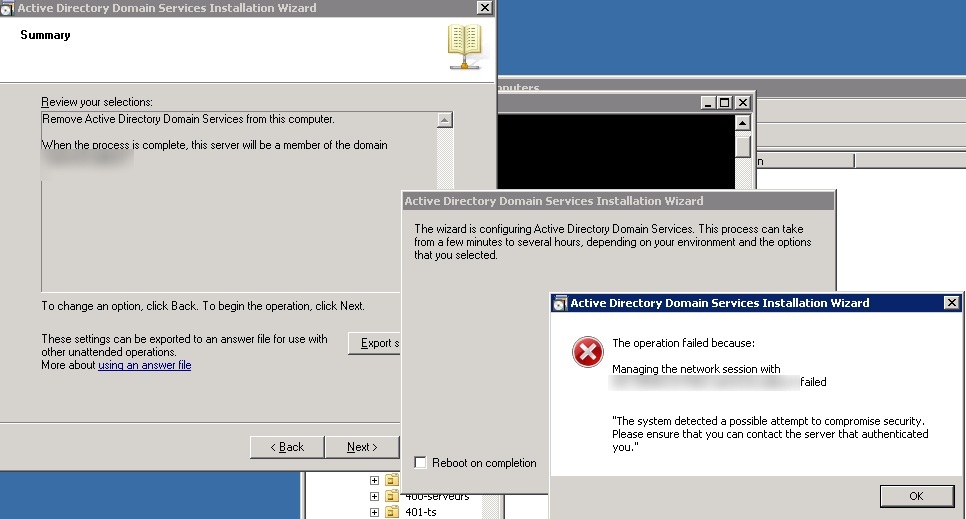
When demoting a domain controller the following error message appeared:
The operation failed because: Managing the network session with dc-srv2.ldap389.local failed.
“The system detected a possible attempt to compromise security. Please ensure that you can contact the server that authenticated you.”
Read more »
Aug
22
2012
Unless you’ve been living underground for the last few weeks, you should have already heard that Windows server 2012 RTM is available :-). Last time I blogged about this operating system it was still named Windows server 8 Developer Preview. I will describe in this post how IIS 8 supports multiple SSL website certificates on a single IP and port, this feature is called Server Name Indication (SNI), and supported under Apache since version 2.2.12… I will also talk about the new features provided in Windows server 2012 for exporting/importing certificates in the PFX file format, in order to deploy certificates on a Webserver farm.
Read more »
Jul
31
2012
We will describe in this post how to remove stale Exchange ActiveSync device partnerships. You can already find a script on the MS Exchange forum that performs this operation, but with that method the deletion can fail in some cases.
Read more »
Jun
28
2012
We will see in this post how to automate the AD database (NTDS.dit) offline defragmentaion with Powershell under Windows 2008 server. With Windows 2008 server, you no longer need to restart the DC in DSRM mode, you just need to stop the Active Directory service.
Read more »